Now that you’re familiar with the host registration process, it’s worth knowing that Niki Live offers another path to earning on the platform, becoming an agent. However, if going live isn’t quite your style, the agent route might be the better fit for you.
Agents play a behind-the-scenes role, focusing on team building and recruiting talented hosts rather than performing on camera. If you have a knack for spotting talent and managing people, those skills translate directly into become a Niki Live agent!
Become Niki Live Agent Step-by-step
1. Download Niki Live and Sign Up
First, start by downloading the Niki Live app using this link. Once installed, open the app and create your account. You can register using Google, Facebook, or phone number.
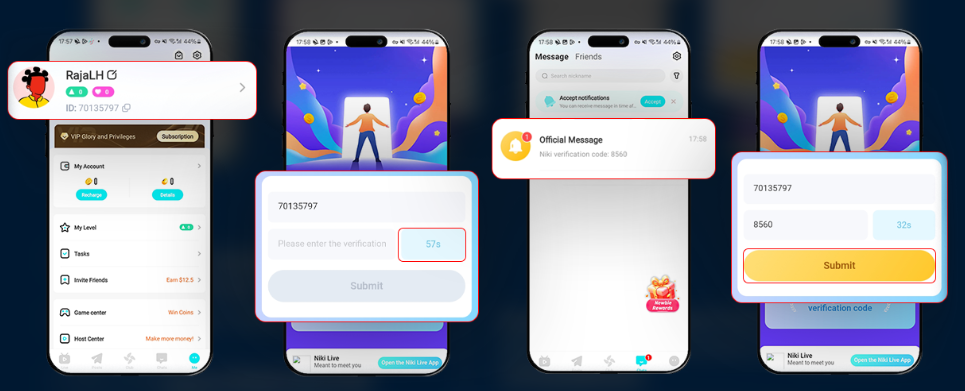
2. Go to Your Profile to Copy the Niki ID
After your account is set up, navigate to your profile page. Just below your profile picture, you’ll find your unique Niki ID. Copy it carefully and keep it on hand, you’ll need it in the next step.
3. Click on the Agency Registration Link
Next, open the agency registration link provided on this page. This will take you directly to the official application form where you’ll submit your request to become a Niki Live agent.
4. Paste your Niki ID and click ‘Get’
Enter your copied Niki ID into the designated field on the form and click the ‘Get’ button. Then, this will trigger a verification code to be sent to your account.
5. Receive a verification code in your Niki app messages
Head back to your Niki Live app and check your inbox. The verification code will arrive in your ‘Official Message’ tab shortly after requesting it.
6. Enter the code and click ‘Submit’
Type the verification code into the form alongside your Niki ID and hit ‘Submit’ to send your agency registration request. Once confirmed, your application is officially on its way.
Live Agency Registration Frequently Asked Questions
- What are the benefits of becoming a Niki Live agent?
Your earnings as a Niki Live agent are a direct reflection of the effort you put in. Agents have access to multiple income streams, including commissions from gifts, their hosts’ earnings, and any sub-agents operating under their management.
- Can one person own more than one agency?
No, each individual is limited to running a single agency on the platform.
- Entered the wrong username during registration?
No need to worry. Your username can be changed at any time through your profile settings after signing up.
- What if I entered the wrong gender or country?
Unfortunately, neither of these can be edited once your account is created. If either detail is incorrect, your only option is to register a new account with the right information.
- Can a host transfer to a different agency?
Yes, though it’s not an instant process. In this case, a host must formally request to leave their current agency and wait for that request to be approved before they can move to a new one.
- Are agents able to go live on Niki Live?
Absolutely, the agent role doesn’t come with any streaming restrictions. All Niki Live agents have full access to the app’s live streaming features whenever they want to go live.
Getting Registered Is Just the Beginning
In conclusion, setting up your Niki Live agent account is a fast and painless process. So, if you’ve followed the steps outlined above, you’re now fully registered and ready to explore everything the platform has in store,from understanding how the host-agent relationship works to discovering the different ways you can grow your income as an agent.
Still have questions about getting started, agency features, or anything else on Niki Live? Our support team is always on hand and happy to help. Feel free to reach out anytime, and don’t forget to check out our blog for more tips, guides, and tutorials down the road!