
With your Niki Live host registration out of the way, face verification is your next and final step before you can start streaming and earning. Every host on the platform must complete it before going live for the first time or requesting a withdrawal, and the good news is it doesn’t take long at all. Here’s everything you need to know about how Niki Live face verification works, along with solutions to a few common problems hosts encounter during the process.
Niki Live Face Verification Guide
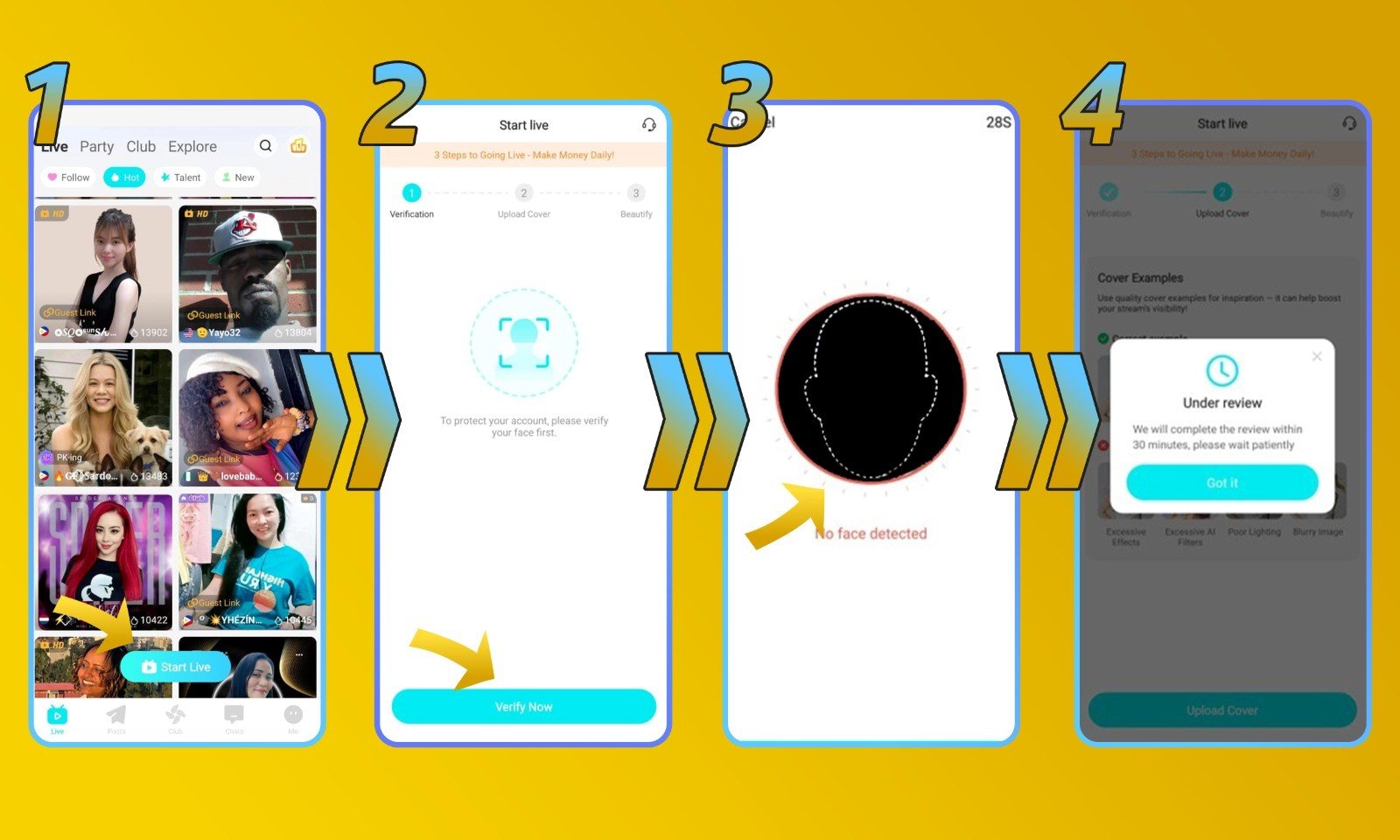
1. Open Niki Live homepage to click ‘Start Live’
First, let’s open your Niki Live app homepage and click the ‘Start Live’ button in the bottom middle of the screen.
2. Click ‘Verify Now’
Then, click the ‘Verify Now’ button.
3. Follow the on-screen instructions
On this step you will be recording yourself and asked to follow several instructions. Make sure to have proper lighting to ensure the process can be done quickly.
4. Wait for the review
Lastly, once you’ve completed the last step, you just have to wait up to 3 business days.
Niki Live Face Verification, Common Problems & Solutions
- The App Won’t Access My Camera
Start by checking that Niki Live has been granted camera permissions in your phone’s settings. It’s also worth making sure you’re running the most up-to-date version of the app. If neither of those fixes it, try restarting your device.
- My Face Verification Is Still Under Review
The majority of verifications are done within minutes. Though certain cases can take up to three business days when a manual review is needed. If your submission has been sitting in review longer than that, don’t hesitate to get in touch with our team and we’ll get you an update.
- My Face Verification Was Rejected
Rejections most commonly occur when the video recorded during verification doesn’t match the profile photo on your account, or when another person is visible in the frame. Take a look at your profile picture and make sure it’s a clear, recent photo of just yourself, then go ahead and run through the verification process again.
Niki Live Face Verification Frequently Asked Questions
- What happens if I don’t complete face verification?
Leaving face verification incomplete means you won’t be able to go live or access any of your earnings. It’s a required step for every host on Niki Live, there’s no way around it.
- What if I mess up during the video verification steps?
Not an issue at all, you can repeat the video verification steps as many times as necessary until it goes through. There’s no penalty or consequence for trying again.
- My face verification keeps getting rejected, what should I do?
You’re free to attempt verification multiple times throughout the day. If you hit the daily attempt limit, simply wait 24 hours before trying again. If the problem persists after several attempts, reach out to our support team and they’ll work with you to get it resolved.
Don’t Wait, Verify Early and Start Earning Sooner
Face verification may feel like a minor checkbox, but putting it off only delays your ability to stream and get paid. Without it, neither going live nor withdrawing your earnings is possible. The process is quick, and this guide has walked you through everything you need to complete it without any trouble.
Still have questions about face verification or anything else on Niki Live? Our team is always just a message away, feel free to reach out anytime or swing by our blog for more helpful information and guides.