Every hour you invest as a Niki Live host or agent deserves a payout experience that’s just as smooth and straightforward. In this guide, we’ll take you through the entire how to withdraw on Niki Live process from beginning to end, covering the requirements you’ll need to meet, a step-by-step walkthrough, answers to the most frequently asked questions, and solutions to the most common issues you might run into along the way. Let’s get into it!
Withdraw Requirements on Niki Live
- Verified Email or Phone Number
Before anything else, make sure you have a verified email address or phone number linked to your Niki Live account. Head over to your profile and confirm that your contact details are properly bound to the app before moving forward.
- Minimum Withdrawal Amount
Your balance needs to meet the minimum threshold before a withdrawal can be initiated. That’s at least $10 USD or 100,000 Beans for standard withdrawals, and $20 for USDT and Binance. Keep in mind that the withdrawal option will only become visible once your account has more than 100 Beans.
- Active Payment Account
Niki Live processes payouts through bank transfer or e-wallet. Whichever method works best for you, make sure the account you plan to use is active and in good standing. For a full list of supported payment options available in your region, check directly inside the app.
Withdraw Tutorial on Niki Live
1. Open your host or agent account profile
To start, let’s open your profile. In the profile menu you will see your ‘Beans’ under the ‘My Account’ menu.

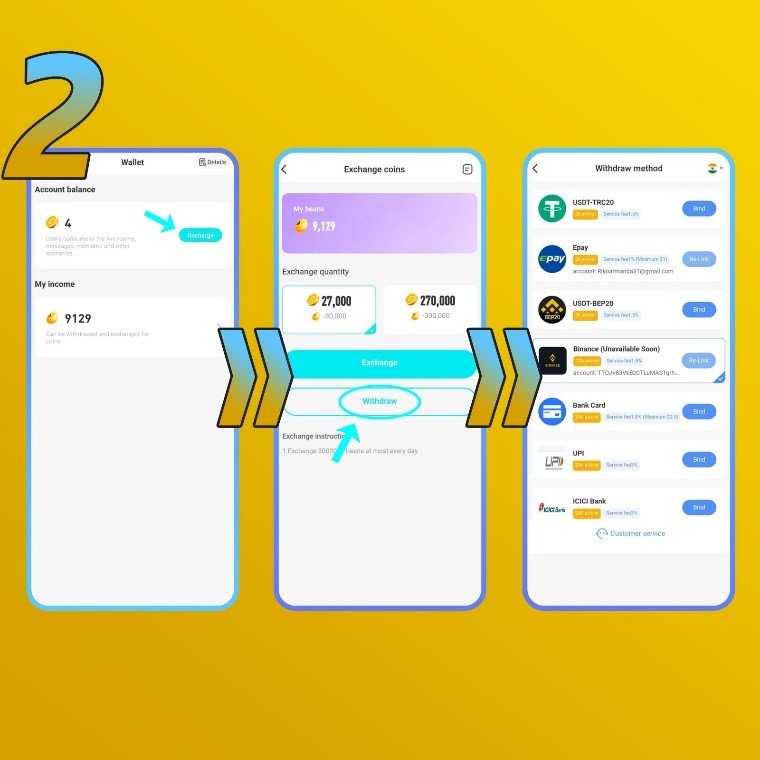
2. Click the ‘Beans’ menu
a. In here, you will see a ‘Recharge’ button, click it.
b. Then you will see the ‘Exchange Rate’ menu. Below the ‘Recharge’ button you will see a ‘Withdraw’ button. If you’re unable to see the withdraw button, you haven’t met the requirement we mentioned above.
c. Choose your preferred methods. We offer bank transfer, PayPal, Epay, Binance, USDT, G-cash, and e-wallet (availability depends on your country)
3. Enter your preferred withdraw information
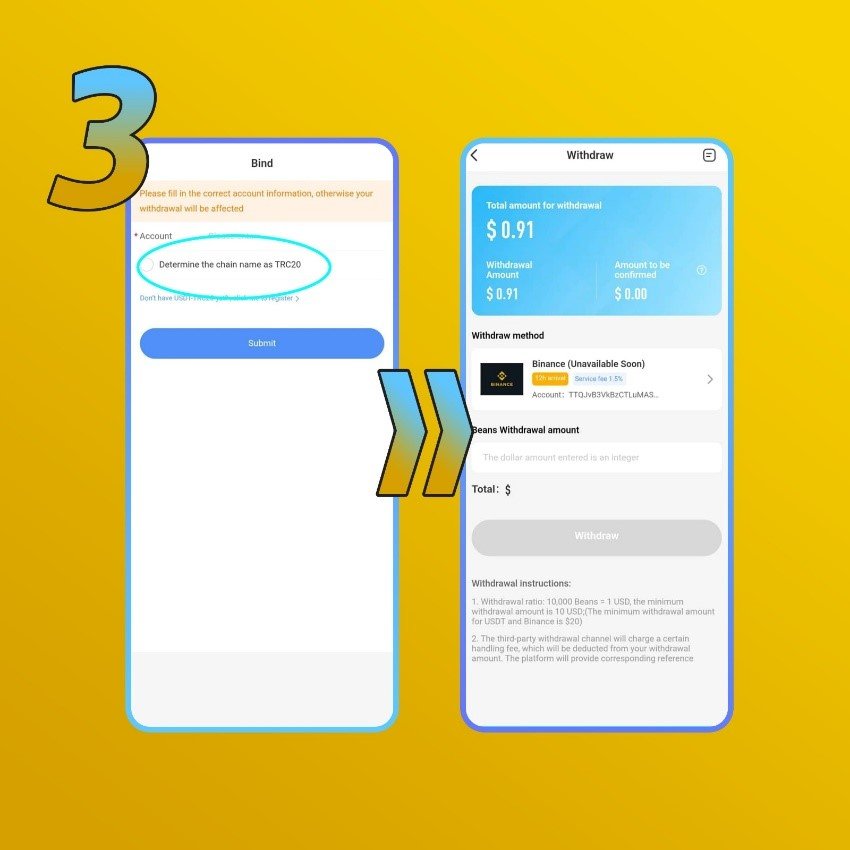
a. If you’re using bank, fill in your name, account number, and bank name
b. If using PayPal, fill in your PayPal email address
Enter the correct information, otherwise it will fail.
c. Determine the amount you want to exchange to USD
Minimum payout amount is 200,000 beans or 20 USD for USDT and Binance, otherwise it is $10.
d. After everything is correct, click ‘Submit’
4. Confirm and wait for the process
a. The process usually takes 3–7 working days depending on the payout method.
Common Problems & Answers
- I can’t see the withdrawal button
The withdrawal button only appears once your account has more than 100 Beans.
- My Beans is on the ‘Review’ period
On Niki Live, after you earn any amount of Beans, it will enter a 24-hour review period. You can withdraw the Beans after the review is approved. This process is automatic, and can take up to 12-24 hours.
- I have $10 but I still can’t withdraw
On Niki Live, there are three types of account balance.
- First, ‘Total Amount for Withdrawal’. It’s the total withdrawable value converted from the Beans you have.
- Second, ‘Withdrawal Amount’. It’s the amount you can withdraw right now.
- Third, ‘Amount to Be Confirmed’. It’s the amount that is still under review, which is not withdrawable.
Niki Live Withdrawal FAQs
- What is the minimum withdrawal amount?
The minimum is $10 USD for standard withdrawals, and $20 for USDT and Binance. All withdrawal amounts must also be made in multiples of 10, for example, $10, $20, $50, or $200.
- What payment methods does Niki Live support?
Niki Live currently supports Epay, USDT, PayPal, bank transfer, and e-wallet. Available options vary depending on your location, check inside the app for the full list of methods supported in your area.
- Are there any transfer fees?
It depends on the payment method you go with. Some third-party providers apply their own transfer fees, and the rate varies from one service to another. It’s worth checking your chosen provider’s fee structure before initiating a withdrawal.
- Can hosts withdraw their own earnings?
Absolutely, hosts have complete control over their withdrawals and can request a payout whenever their balance is ready.
- What if I linked the wrong payment account?
No need to stress. There are no restrictions on unlinking a payment account from your Niki Live profile. You can remove and replace your payment details at any time without any issues.
- Why does a specific payment method not show up?
Certain payment options are region-dependent and may not be available in your area. Simply select from whichever methods are currently showing up as available for your location.
- Why is my withdrawal taking longer than expected?
Under normal circumstances, withdrawals are processed within seven business days. If yours has been pending longer than that, reach out to our support team and we’ll look into it for you.
Your Earnings Are Ready When You Are
When all the requirements are in place, cashing out on Niki Live is as simple and seamless as it gets. Whether you’re a host or an agent, the key to a smooth withdrawal comes down to one thing, making sure your payment details are accurate and your preferred method is properly configured before you hit confirm.
Still have questions about withdrawals or anything else on Niki Live? Our support team is always available and happy to help. Don’t hesitate to reach out anytime, and be sure to visit our blog for more useful tips, guides, and tutorials to help you get the most out of the platform.