Niki Live Host Rules & Guidelines
The goal of going live for hosts is to gain gifts, so hosts need to make sure users stay as long as possible in your live room. Make sure you show the best of yourself and the live scene (live background, decoration, lighting, and theme) to users.
Registration Rules
- Hosts are prohibited from registering multiple accounts
- Engaging in pornographic or sexuality content is prohibited
- Promotion of third-party platforms is prohibited
- Minors are prohibited from live streaming
Live Cover Photo Rules
- Only hosts with qualified cover photos will appear on the live page
- Your live cover photo must look presentable and attractive
- Your live background should be clean and bright
- Hosts should use a high-quality upper body photo for the live cover.
Live Broadcast Guidelines
- Keep your face visible on camera during the live stream
- Sit in a comfortable posture, focus on the live broadcast, and avoid lying on the bed
- Keep the live broadcast environment clean and bright
- Wear makeup and proper attire, and use beauty filters appropriately
How to Start a Quality Live Broadcast
Before live broadcast
1. Set up a clean, tidy background for your live stream. Use a solid-color background such as curtains or wallpaper, or purchase a backdrop from Taobao. Avoid chaotic backgrounds
2. Adjust the camera angle to show your upper body, not just your face or head. This creates a more flattering, slender appearance
3. Apply makeup before going live. Choose a flattering filter (avoid overexposure or excessive whitening). Avoid low-quality setups such as lying down, filming empty spaces, or unmanned camera angles.
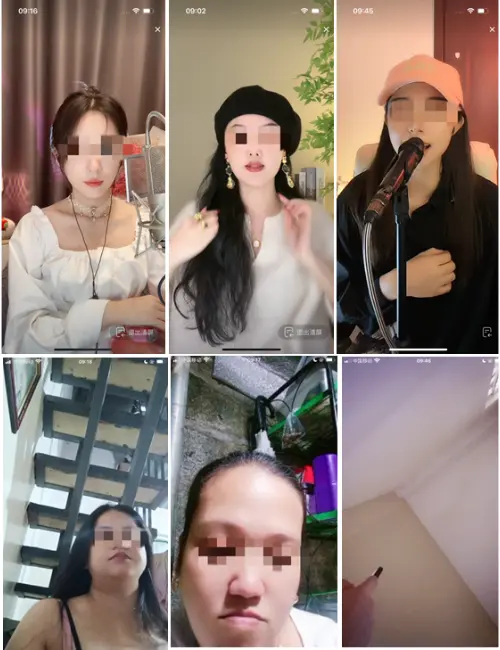
4. Use beautiful photos as profile and live cover
5. The host must be familiar with the rules of the platform before start broadcasting live, and be familiar with what behaviors will lead to violations and punishments, such as: pornography, smoking, and minors appearing in the camera
6. Adjust your broadcast status to ensure that you can maintain full energy and interact with users during the live broadcast
In livestreaming
1. When the live broadcast starts. If possible, you can use another account to enter your live broadcast room to check your live broadcast scene and camera angle, or ask familiar users to check the live broadcast room for help. If you find that you can optimize it, adjust it immediately to ensure the best scene state
2. Interact with users entering the live broadcast room in a timely manner, greet and retain users (you can introduce activities in the live broadcast room or show your talents to users, in short, you need to catch his attention in time to keep users in your live broadcast room )
3. During the live broadcast, remember to guide users to give gifts to their live broadcast room, like and follow themselves, these will help promote the platform to push more users to the host
4. Express thanks to users, remind users of their own broadcast time, and guide them to continue to interact with your live broadcast room
After Live
1. Get in touch with your fans or users who brush gifts to further maintain the relationship
2. Post the highlight moment of the live broadcast to the community page to get more traffic
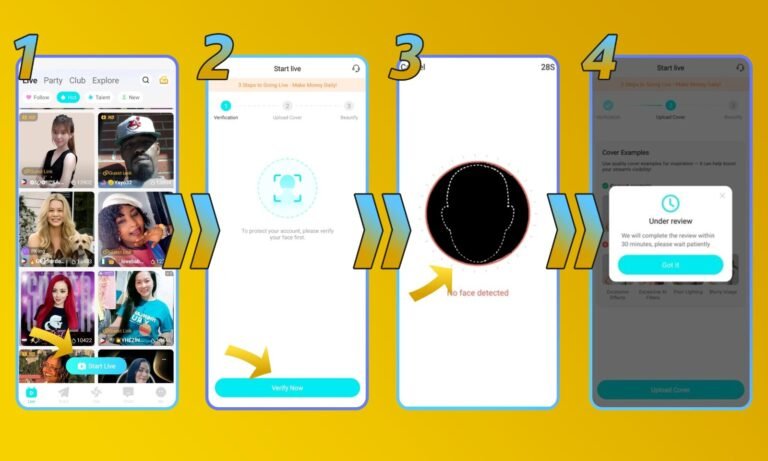
How to Complete Face Verification for Host
- Go to your Niki Live homepage then click ‘Start Live’
- Click ‘Verify Now’
- Follow the on-screen instructions for face verification
- Once completed, we will verify it. The process can take up to 3 business days
How to Receive Balance on Niki Live
- Log in to your host or agent account and open your profile
- Your account need to be verified and is an active host before you can receive your balance.
- In the profile you will see your ‘Beans’
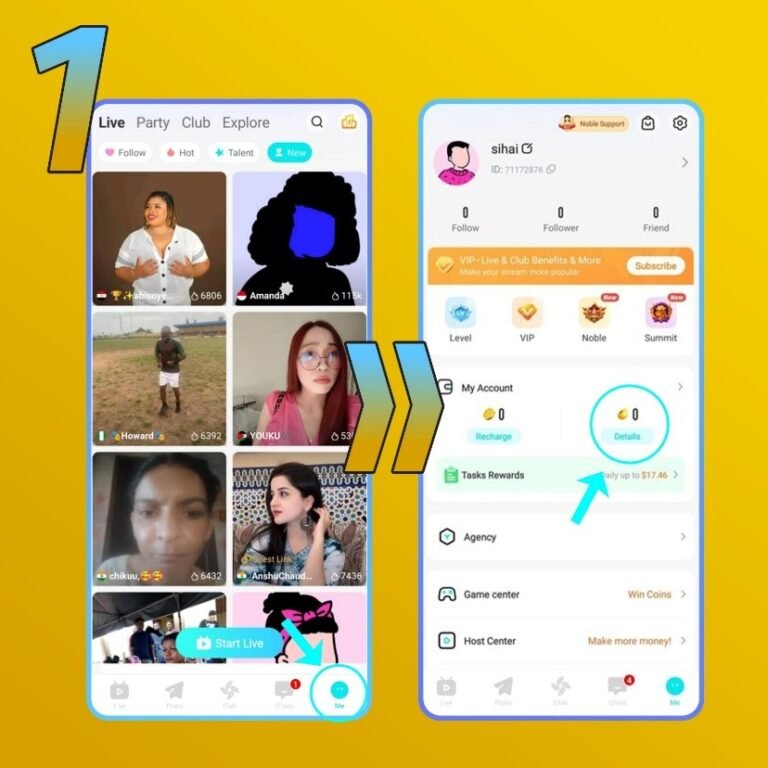
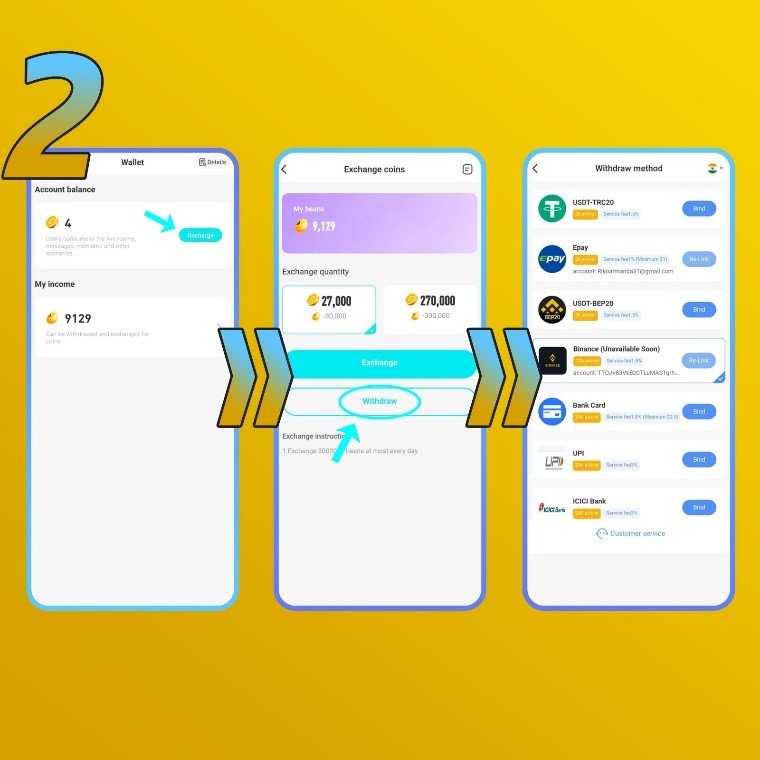
2. Click the ‘Beans’ menu
- Click the ‘Recharge’ button
- Click ‘Withdraw’
- Choose your prefer methods. We offer bank transfer, PayPal, Epay, Binance, USDT, G-cash, and e-wallet (availability depends on your country)
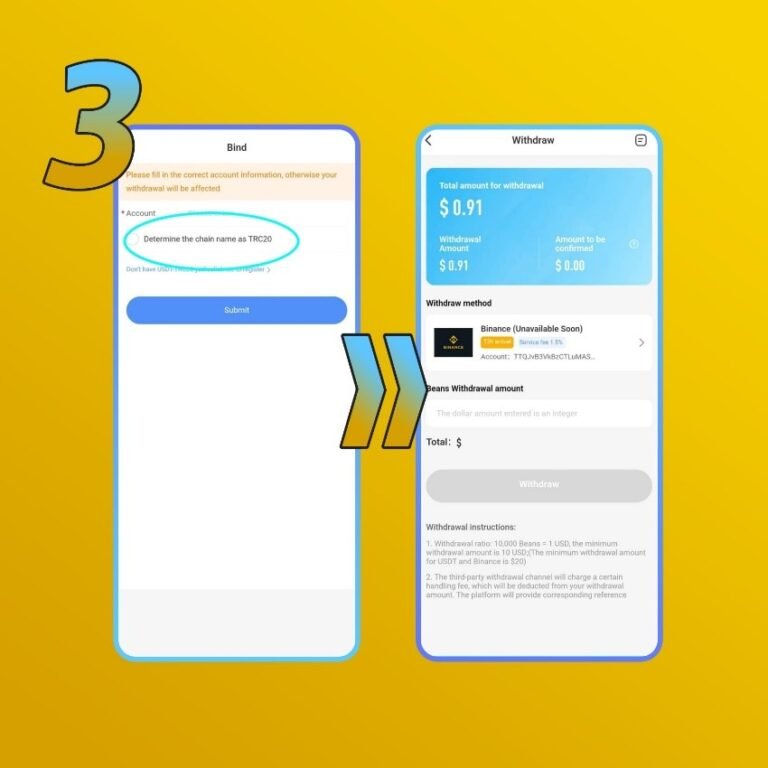
3. Enter your preferred payout information
- If using bank, fill in your name, account number, and bank name
- If using PayPal, fill in your PayPal email address
- Enter the correct information, otherwise it will fail
- Determine the amount you want to exchange to USD
- Minimum payout amount is 100,000 beans or 10 USD. This amount may change.
- After everything is correct, click ‘Submit’
During live broadcast
- 1. At the start of your stream, have someone check your setup using another account or ask a trusted user for feedback. Make adjustments as needed to optimize your scene.
- 2. Interact with users as soon as they enter. Greet them and keep them engaged by highlighting activities or demonstrating your talents.
- 3. Remind users to send gifts, like, and follow during your broadcast. This increases your visibility and helps the platform recommend you to more users.
- 4. Thank your viewers, share your streaming schedule, and invite them to continue engaging with your stream.
After live broadcast
- 1. Connect with fans and users who send gifts to build stronger relationships.
- 2. Share highlight moments from your stream on the community page to gain more visibility.
Familiarize yourself with platform rules to avoid violations. We hope you earn great gifts and enjoy your time on Niki Live!